Workflow labs use the variant template: Goal → Approach → Execution → Check → Report.
Learning objectives
Describe the role of R, RStudio, Quarto, and renv in a reproducible analysis toolchain.
Initialise a project that a collaborator can clone and run without guesswork.
Produce a rendered Quarto document from an R chunk that draws on a pinned package environment.
Prerequisites
R, RStudio, and Quarto installed (see Get started).
Background
A statistical analysis is only as trustworthy as the environment that produced it. A result that depends on the version of a package, the operating system of the analyst, or an undocumented installation step cannot be confidently rerun by anyone else — including the analyst six months later. The job of the toolchain is to make the set of dependencies explicit and easy to restore.
R provides the language; RStudio provides an integrated environment that keeps project files, editor, console, and version control in one place; Quarto renders source documents into articles, slides, and reports while interleaving text and executable code. The last piece, renv, pins package versions to a lockfile that lives with the project. Together these give you a project that is self-contained, rebuildable on another machine, and testable against changes in its own dependencies.
Beginners often think of reproducibility as a requirement imposed by journals. The real payoff is more selfish: a colleague can pick up a project without you having to answer questions, a revision cycle does not force you to reconstruct the environment you used six months ago, and a silent upgrade of a package does not break a graph you no longer remember how to draw.
Stand up a minimal reproducible R project and demonstrate the commands that keep it reproducible: version reporting, environment snapshotting, and rendering.
2. Approach
A reproducible project has four minimum ingredients: a working directory, a package lockfile, a document that can be re-rendered, and a record of the R session. In this lab we simulate a tiny dataset, draw a figure from it, and record the environment used to produce both.
lab <-tibble(subject =seq_len(30),group =rep(c("A", "B"), each =15),value =c(rnorm(15, mean =10, sd =2),rnorm(15, mean =12, sd =2)))lab
# A tibble: 30 × 3
   subject group value
     <int> <chr> <dbl>
 1       1 A     12.7
 2       2 A      8.87
 3       3 A     10.7
 4       4 A     11.3
 5       5 A     10.8
 6       6 A      9.79
 7       7 A     13.0
 8       8 A      9.81
 9       9 A     14.0
10      10 A      9.87
# ℹ 20 more rows
3. Execution
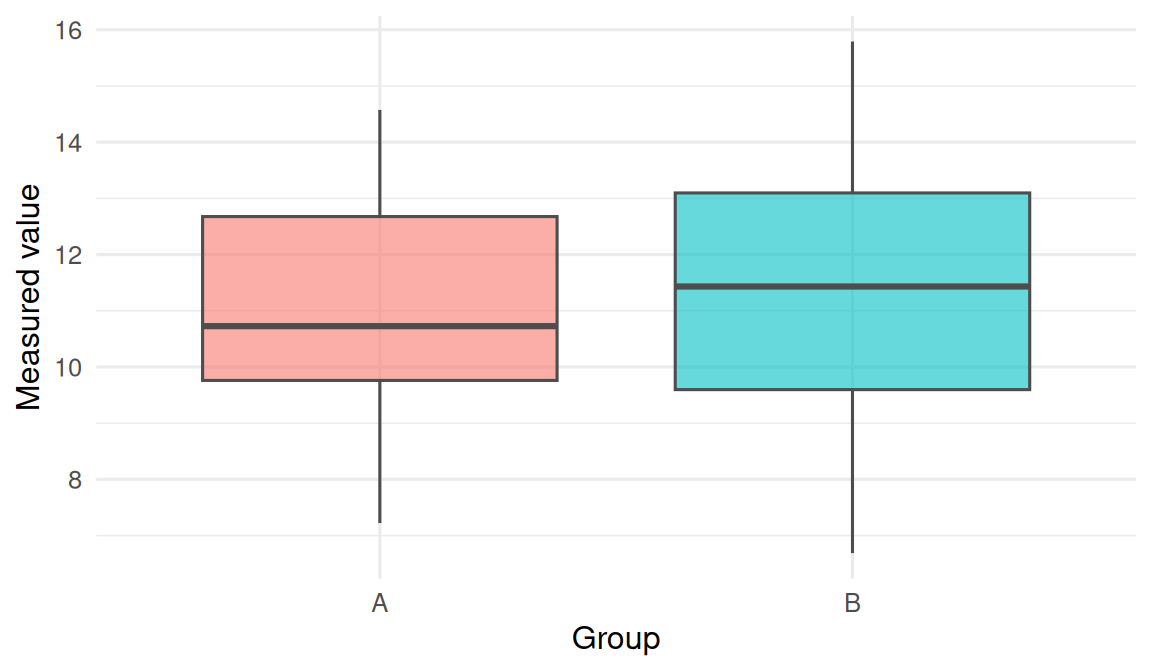
lab |>ggplot(aes(group, value, fill = group)) +geom_boxplot(alpha =0.6, colour ="grey30") +labs(x ="Group", y ="Measured value") +theme(legend.position ="none")
The chunk above is what a reader would rerun. It must be self-contained: the data are simulated inside the document, the seed is set, and only tidyverse is required.
Project anatomy
A minimal project contains:
my-project.Rproj — the RStudio project file (an anchor for the working directory).
renv.lock — the JSON lockfile of pinned package versions.
renv/ — the project’s private package library.
An index.qmd or report .qmd — your narrative.
A code/ or R/ folder — your scripts.
A data/ folder — ideally small and read-only; never raw CSVs you edited by hand.
renv in three commands
# run once per project, after creating the .Rprojrenv::init()# after installing or upgrading packagesrenv::snapshot()# on a new machine, after cloning the reporenv::restore()
The renv::status() command reports drift between the library and the lockfile. In a shared project, your rule of thumb is: if status() reports anything other than “project is synchronised with the lockfile”, do not commit.
4. Check
R.version.string
[1] "R version 4.5.2 (2025-10-31 ucrt)"
# A minimal package-version report we can include in any write-up.installed_versions <-tibble(package =c("tidyverse", "ggplot2", "dplyr"),version =sapply(c("tidyverse", "ggplot2", "dplyr"),function(p) as.character(packageVersion(p))))installed_versions
# A tibble: 3 × 2
  package   version
  <chr>     <chr>
1 tidyverse 2.0.0
2 ggplot2   4.0.3
3 dplyr     1.2.1
The two outputs above — R version plus a small table of key package versions — are what a reviewer needs to rerun the figure. Everything larger (sessionInfo()) lives at the bottom of the document.
5. Report
A reproducible analysis is carried out in a project folder anchored by an .Rproj file, with dependencies pinned in renv.lock and narrative plus code in a Quarto document. In this lab, 30 simulated observations were generated from two normal distributions and plotted as a boxplot; the document was rendered with R R version 4.5.2 (2025-10-31 ucrt) and tidyverse 2.0.0.
The important phrase is self-contained. A file that someone else can run by cloning the repository and typing quarto render is the unit of reproducibility in this course.
Common pitfalls
Installing packages outside the project library, then wondering why renv::restore() on another machine produces different output.
Editing renv.lock by hand. Do not. Use snapshot().
Committing renv/library/ to git. The lockfile is what is tracked; the library is restored locally.
Rendering a Quarto doc that reads a file outside the project directory, then sharing only the .qmd.