library(tidyverse)
set.seed(42)
theme_set(theme_minimal(base_size = 12))Week 1, Session 2 — R, RStudio, Quarto, and renv toolchain
Course 1 — #courses
Note
Workflow labs use the variant template: Goal → Approach → Execution → Check → Report.
Learning objectives
- Describe the role of R, RStudio, Quarto, and renv in a reproducible analysis toolchain.
- Initialise a project that a collaborator can clone and run without guesswork.
- Produce a rendered Quarto document from an R chunk that draws on a pinned package environment.
Prerequisites
R, RStudio, and Quarto installed (see Get started).
Background
A statistical analysis is only as trustworthy as the environment that produced it. A result that depends on the version of a package, the operating system of the analyst, or an undocumented installation step cannot be confidently rerun by anyone else — including the analyst six months later. The job of the toolchain is to make the set of dependencies explicit and easy to restore.
R provides the language; RStudio provides an integrated environment that keeps project files, editor, console, and version control in one place; Quarto renders source documents into articles, slides, and reports while interleaving text and executable code. The last piece, renv, pins package versions to a lockfile that lives with the project. Together these give you a project that is self-contained, rebuildable on another machine, and testable against changes in its own dependencies.
Beginners often think of reproducibility as a requirement imposed by journals. The real payoff is more selfish: a colleague can pick up a project without you having to answer questions, a revision cycle does not force you to reconstruct the environment you used six months ago, and a silent upgrade of a package does not break a graph you no longer remember how to draw.
Setup
1. Goal
Stand up a minimal reproducible R project and demonstrate the commands that keep it reproducible: version reporting, environment snapshotting, and rendering.
2. Approach
A reproducible project has four minimum ingredients: a working directory, a package lockfile, a document that can be re-rendered, and a record of the R session. In this lab we simulate a tiny dataset, draw a figure from it, and record the environment used to produce both.
lab <- tibble(
  subject = seq_len(30),
  group   = rep(c("A", "B"), each = 15),
  value   = c(rnorm(15, mean = 10, sd = 2),
              rnorm(15, mean = 12, sd = 2))
)
lab
# A tibble: 30 × 3
subject group value
<int> <chr> <dbl>
1 1 A 12.7
2 2 A 8.87
3 3 A 10.7
4 4 A 11.3
5 5 A 10.8
6 6 A 9.79
7 7 A 13.0
8 8 A 9.81
9 9 A 14.0
10 10 A 9.87
# ℹ 20 more rows3. Execution
lab |>
  ggplot(aes(group, value, fill = group)) +
  geom_boxplot(alpha = 0.6, colour = "grey30") +
  labs(x = "Group", y = "Measured value") +
  theme(legend.position = "none")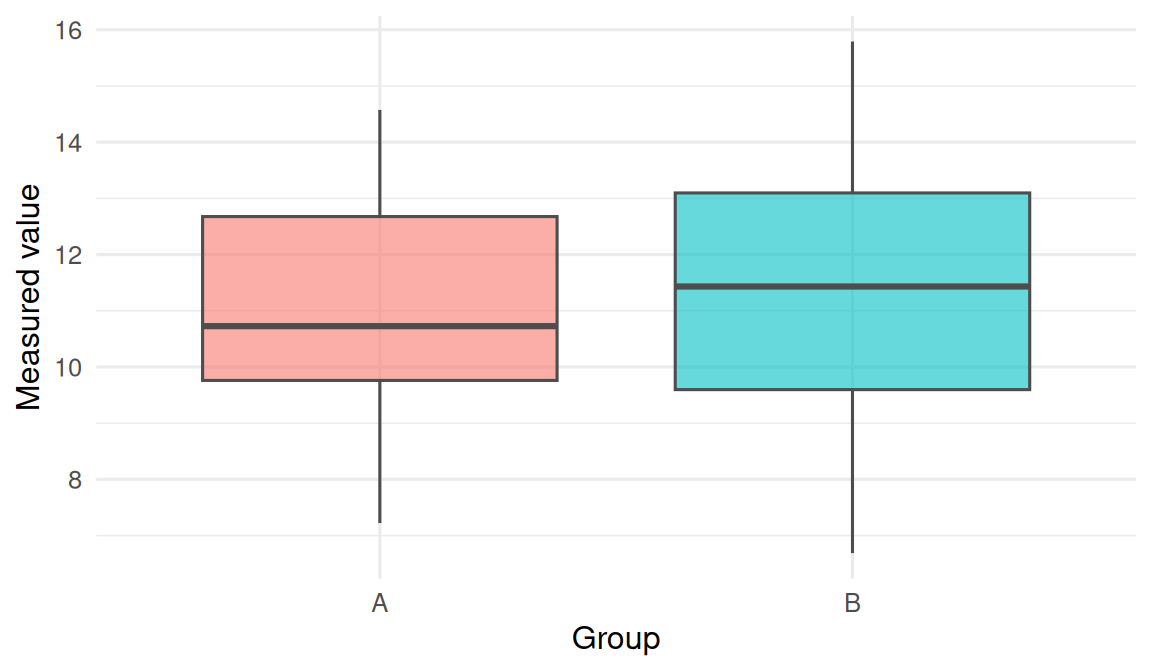
The chunk above is what a reader would rerun. It must be self-contained: the data are simulated inside the document, the seed is set, and only tidyverse is required.
Project anatomy
A minimal project contains:
my-project.Rproj— the RStudio project file (an anchor for the working directory).renv.lock— the JSON lockfile of pinned package versions.renv/— the project’s private package library.- An
index.qmdor report.qmd— your narrative. - A
code/orR/folder — your scripts. - A
data/folder — ideally small and read-only; never raw CSVs you edited by hand.
renv in three commands
# run once per project, after creating the .Rproj
renv::init()

# after installing or upgrading packages
renv::snapshot()

# on a new machine, after cloning the repo
renv::restore()
The renv::status() command reports drift between the library and the lockfile. In a shared project, your rule of thumb is: if status() reports anything other than “project is synchronised with the lockfile”, do not commit.
4. Check
R.version.string[1] "R version 4.5.2 (2025-10-31 ucrt)"# A minimal package-version report we can include in any write-up.
installed_versions <- tibble(
package = c("tidyverse", "ggplot2", "dplyr"),
version = sapply(c("tidyverse", "ggplot2", "dplyr"),
function(p) as.character(packageVersion(p)))
)
installed_versions# A tibble: 3 × 2
package version
<chr> <chr>
1 tidyverse 2.0.0
2 ggplot2 4.0.3
3 dplyr 1.2.1 The two outputs above — R version plus a small table of key package versions — are what a reviewer needs to rerun the figure. Everything larger (sessionInfo()) lives at the bottom of the document.
5. Report
A reproducible analysis is carried out in a project folder anchored by an
.Rprojfile, with dependencies pinned inrenv.lockand narrative plus code in a Quarto document. In this lab, 30 simulated observations were generated from two normal distributions and plotted as a boxplot; the document was rendered with R R version 4.5.2 (2025-10-31 ucrt) and tidyverse 2.0.0.
The important phrase is self-contained. A file that someone else can run by cloning the repository and typing quarto render is the unit of reproducibility in this course.
Emphasise during the session that renv::snapshot() is not a once-per-project command; it needs to run any time a package changes. Walk through a cold renv::restore() on a fresh clone.
Common pitfalls
- Installing packages outside the project library, then wondering why
renv::restore()on another machine produces different output. - Editing
renv.lockby hand. Do not. Usesnapshot(). - Committing
renv/library/to git. The lockfile is what is tracked; the library is restored locally. - Rendering a Quarto doc that reads a file outside the project directory, then sharing only the
.qmd.
Further reading
- Quarto documentation: quarto.org.
- renv documentation:
vignette("renv"). - Wickham H. R Packages, chapter on project organisation.
Session info
sessionInfo()R version 4.5.2 (2025-10-31 ucrt)
Platform: x86_64-w64-mingw32/x64
Running under: Windows 11 x64 (build 26200)
Matrix products: default
LAPACK version 3.12.1
locale:
[1] LC_COLLATE=English_Germany.utf8 LC_CTYPE=English_Germany.utf8
[3] LC_MONETARY=English_Germany.utf8 LC_NUMERIC=C
[5] LC_TIME=English_Germany.utf8
time zone: Europe/Berlin
tzcode source: internal
attached base packages:
[1] stats graphics grDevices utils datasets methods base
other attached packages:
[1] lubridate_1.9.5 forcats_1.0.1 stringr_1.6.0 dplyr_1.2.1
[5] purrr_1.2.2 readr_2.2.0 tidyr_1.3.2 tibble_3.3.1
[9] ggplot2_4.0.3 tidyverse_2.0.0
loaded via a namespace (and not attached):
[1] gtable_0.3.6 jsonlite_2.0.0 compiler_4.5.2 tidyselect_1.2.1
[5] scales_1.4.0 yaml_2.3.12 fastmap_1.2.0 R6_2.6.1
[9] labeling_0.4.3 generics_0.1.4 knitr_1.51 htmlwidgets_1.6.4
[13] pillar_1.11.1 RColorBrewer_1.1-3 tzdb_0.5.0 rlang_1.2.0
[17] utf8_1.2.6 stringi_1.8.7 xfun_0.57 S7_0.2.2
[21] otel_0.2.0 timechange_0.4.0 cli_3.6.6 withr_3.0.2
[25] magrittr_2.0.4 digest_0.6.39 grid_4.5.2 hms_1.1.4
[29] lifecycle_1.0.5 vctrs_0.7.3 evaluate_1.0.5 glue_1.8.1
[33] farver_2.1.2 rmarkdown_2.31 tools_4.5.2 pkgconfig_2.0.3
[37] htmltools_0.5.9